Article
7 Best Internal Audit Softwares for 2026

Eric Sydell, PhD
|
Updated on
|
Created on
The conversation around audit technology has moved beyond simple workpaper management. Today, the most impactful internal audit softwares use automation and artificial intelligence to fundamentally change how work gets done. Instead of relying on small sample sizes, teams can now test entire populations of data. Instead of manually reviewing hundreds of screenshots, they can use systems that interpret evidence automatically. This shift allows auditors to provide a higher level of assurance with greater efficiency. This article examines several platforms leading this change, explaining their technology and the specific problems they solve for modern audit and compliance teams.
Key Takeaways
Identify your primary challenge first: Decide whether you need a broad platform to manage all risk activities or a focused tool to automate specific tasks like control testing.
Look for automation and integration capabilities: Effective software reduces manual work by automating repetitive tasks and connecting with your other business systems, ensuring data is both accurate and accessible.
Look beyond the software's features: A successful adoption depends on a thorough evaluation process, including hands-on demos, and a clear plan for training your team and migrating data.
A Comparison of Top Internal Audit Software
Choosing the right internal audit software is a critical decision that shapes how your team manages risk and compliance. The market offers a range of tools, each with a different approach. Some platforms provide a comprehensive suite for all Governance, Risk, and Compliance (GRC) activities, acting as a central system of record for audit, risk, and regulatory functions. Others use artificial intelligence to automate specific, time-consuming tasks like evidence review and control testing, freeing up auditors to focus on higher-level analysis.
Understanding these differences is the first step toward finding the right fit for your organization’s size, industry, and maturity. An early-stage public company preparing for its first Sarbanes-Oxley (SOX) audit has different needs than a mature global enterprise managing dozens of regulatory frameworks. This comparison covers seven top internal audit software solutions, highlighting what each platform does and who it is designed for. This overview can help you create a shortlist of vendors to evaluate further.
Vero AI: AI-Powered Governance and Compliance Analytics
Vero AI provides a governance and compliance analytics platform that uses artificial intelligence to automate evidence review and control testing. The system is designed to interpret compliance evidence from documents, spreadsheets, and screenshots. It then validates this evidence against control requirements from frameworks like SOX and ISO 27001. This approach helps internal audit teams reduce the manual work involved in gathering and testing evidence.
Instead of relying on sampling, teams can test larger populations of data on a continuous basis. The platform produces audit-ready workpapers that link every conclusion back to the specific evidence reviewed, creating a clear and defensible audit trail for regulators and external auditors. This is particularly useful for organizations looking to improve the efficiency and reliability of their SOX testing programs. You can request a demo to see how the platform handles specific testing scenarios.
AuditBoard: Comprehensive GRC Platform
AuditBoard offers a connected risk platform that brings audit, risk, and compliance management into a single, unified system. Its modules cover a wide range of activities, including SOX compliance, operational audits, IT risk management, and environmental, social, and governance (ESG) reporting. The platform is designed to improve collaboration between teams and provide a centralized view of risk across the organization.
AuditBoard helps organizations move away from managing compliance in spreadsheets and shared folders. It provides tools for workflow automation, issue management, and real-time reporting through dashboards. This integrated approach allows teams to streamline audit planning and execution while giving leadership better visibility into the organization's overall risk posture. It is a strong fit for teams seeking a single system of record for all their GRC activities.
Workiva: Connected Reporting and Compliance
Workiva is a cloud platform focused on connected reporting and compliance. It is well-known for its ability to link data from different sources, such as enterprise resource planning (ERP) systems and spreadsheets, directly into reports and regulatory filings. This ensures that numbers and narratives are consistent across all documents, which is critical for financial reporting and SEC filings.
While Workiva serves finance and accounting teams broadly, its audit management solution helps internal auditors manage their entire workflow. This includes risk assessment, planning, fieldwork, and reporting. The platform’s strength lies in its data integration capabilities, which simplify the process of gathering evidence and preparing reports for SOX, financial audits, and other compliance requirements. It is often chosen by organizations where reporting accuracy and data consistency are primary concerns.
MindBridge AI: AI-Driven Risk Detection
MindBridge AI is a platform that uses artificial intelligence to analyze financial data and identify high-risk transactions. It examines entire datasets, such as a company's general ledger, to detect anomalies and patterns that might indicate errors or fraudulent activity. The system scores transactions based on risk, allowing auditors to focus their attention where it is needed most.
This technology is used by both internal audit teams and external accounting firms to enhance the quality and efficiency of financial audits. By analyzing 100% of transactions, MindBridge helps auditors move beyond traditional sampling methods. This provides a deeper level of assurance over financial reporting and internal controls. The platform is a good choice for teams that want to apply data analytics specifically to financial transaction testing.
TeamMate+: Audit Management and Workflow
TeamMate+ from Wolters Kluwer is a comprehensive audit management software designed to help internal audit departments manage their work. The platform provides a centralized system for every phase of the audit lifecycle, from annual planning and risk assessment to fieldwork execution and reporting. It is built to align with professional standards from the Institute of Internal Auditors (IIA).
The software includes features for creating and managing electronic workpapers, tracking issues and recommendations, and managing audit resources. TeamMate+ helps teams standardize their audit processes and improve collaboration. It serves as a central repository for all audit-related information, creating a single source of truth for the department. It is a long-standing solution in the market, often favored by established internal audit teams.
ProcessGene: GRC and Process Management
ProcessGene offers a suite of Governance, Risk, and Compliance (GRC) software with a strong emphasis on business process management. The platform helps organizations map their internal controls to specific business processes, regulations, and risks. This process-centric approach provides a clear line of sight from high-level compliance objectives down to day-to-day operational activities.
The software allows users to create a central catalog of controls and link them to multiple regulations, which helps reduce redundant testing efforts. ProcessGene is designed for organizations that want to embed compliance and risk management directly into their operational workflows, ensuring that controls are an integral part of how the business runs. This makes it a good option for companies in highly regulated industries where process adherence is key.
LogicGate: Risk and Compliance Operations
LogicGate provides a flexible platform for managing risk and compliance operations. Using a no-code interface, teams can build and automate custom workflows for processes like control testing, policy management, and incident response. This high degree of customization makes it a popular choice for companies with unique or rapidly changing GRC requirements that do not fit a standard, out-of-the-box solution.
The platform, known as Risk Cloud, helps organizations replace manual spreadsheet-based processes with automated workflows. It connects people, processes, and data to provide a real-time, holistic view of risk. This enables teams to respond faster to emerging threats and demonstrate compliance more effectively. LogicGate is ideal for tech-forward companies that want to build their own GRC applications without writing code.
What to Look For in Internal Audit Software
Choosing the right internal audit software requires looking beyond a simple list of features. The goal is to find a platform that aligns with your team’s workflow, integrates with your existing technology, and can scale with your organization. A thoughtful evaluation focuses on how the software solves specific problems, from the time spent gathering evidence to the clarity of reports for the audit committee.
Key capabilities separate modern audit platforms from traditional ones. These include the ability to automate repetitive tasks, provide real-time insights, and manage compliance across multiple regulatory frameworks. As you evaluate options, consider how each feature will impact your team's daily work and your organization's overall risk and compliance posture. The right tool should make your audit process more efficient, consistent, and strategic.
Automated Risk Assessment and Control Testing
Manual control testing is one of the most time-consuming parts of an audit. It often involves repetitive sampling and evidence review that can be prone to human error. Look for software that automates these tasks. Automated tools can test complete data sets instead of just samples, providing a more comprehensive view of your control environment.
This automation allows your team to move away from mechanical checks and focus on higher-value activities, like investigating exceptions and advising the business on risk. According to Riskonnect, automated risk assessment tools help you more quickly identify and address vulnerabilities in your company's controls. This shift from manual work to strategic analysis is a primary benefit of modern audit software.
Real-Time Reporting and Dashboards
Waiting for quarterly or annual reports to understand your compliance status is no longer practical. Internal audit software should provide real-time visibility through clear and intuitive dashboards. These tools translate complex audit data into straightforward visuals, making it easy for stakeholders, including executives and board members, to grasp the organization's risk posture at a glance.
This immediate access to information supports better decision-making. Instead of reacting to old data, leadership can proactively address emerging issues. Look for platforms that allow you to customize dashboards for different audiences, ensuring everyone gets the information they need without being overwhelmed by irrelevant details. This capability helps make audit findings more accessible and actionable for the entire organization.
Integration with Enterprise Systems
An audit platform’s value increases when it connects with your other business systems. Without integration, auditors often spend hours manually exporting data from enterprise resource planning (ERP) systems, customer relationship management (CRM) software, and other applications. This process is not only inefficient but also introduces the risk of data entry errors.
The best internal audit software offers pre-built connectors or a flexible application programming interface (API) for seamless data exchange. This ensures that auditors are working with accurate, timely information directly from the source systems. According to an analysis by Vitre, evaluating integration capabilities is a critical step to ensure compatibility with your existing technology stack.
Document Management and Evidence Tracking
Managing audit evidence through shared drives and email is a recipe for confusion. A key feature of any internal audit software is a centralized repository for all audit-related documents. This creates a single source of truth, making files easy to find, review, and manage throughout the audit lifecycle.
Beyond simple storage, look for robust evidence tracking. The software should create a clear and unchangeable audit trail that links every conclusion back to the specific evidence that supports it. This traceability is essential for quality assurance reviews and for defending your work to external auditors and regulators. It ensures that every finding is backed by organized, accessible proof.
Workflow Automation and Collaboration Tools
Effective audit software streamlines the entire audit process, from planning and fieldwork to reporting and follow-up. Workflow automation handles administrative tasks like assigning work, sending reminders for evidence requests, and managing review and approval cycles. This frees up auditors to concentrate on the substance of the audit rather than on project management.
Collaboration features are equally important, especially for teams that work remotely. The software should allow team members to communicate, share findings, and review workpapers within the platform. This keeps all audit-related conversations and decisions in one place, creating a complete record of the engagement and improving team efficiency.
Compliance and Regulatory Framework Management
Many organizations must comply with a growing list of regulations, such as Sarbanes-Oxley (SOX), ISO 27001, and HIPAA. Managing these requirements separately creates redundant work. Look for software that allows you to map your internal controls to multiple frameworks. This "test once, comply many" approach saves significant time and effort.
The platform should simplify compliance by aligning your audit activities with the latest versions of these frameworks. This ensures your organization remains current with its obligations. The ability to manage multiple sets of rules in a single, unified system is a powerful feature for any organization operating in a complex regulatory environment.
Cloud-Based Architecture with Mobile Access
Modern internal audit work happens everywhere, not just at a desk. Cloud-based software provides the flexibility for your team to access audit plans, workpapers, and evidence from any location. This is a significant advantage over older, on-premise systems that limit access and can be difficult to maintain.
Software as a Service (SaaS) platforms typically offer better scalability, automatic updates, and lower IT overhead. Many also provide mobile access, allowing auditors to capture notes or upload evidence directly from their phones or tablets while in the field. This anywhere-access capability makes the audit process more fluid and efficient, adapting to the way modern teams work.
How to Compare Internal Audit Software Pricing
Choosing the right internal audit software requires balancing your team’s needs with your budget. Pricing can vary widely, from a few thousand dollars to well over six figures annually. Understanding the different tiers and what they include is the first step to finding a solution that fits your organization. The price often reflects the platform's complexity, the number of users, and the level of support provided. As you evaluate options, think about not just the sticker price, but the total value the software brings to your audit process.
Enterprise Solutions ($50,000+ Annually)
Enterprise-level software is built for large, complex organizations that manage multiple compliance frameworks across different business units. These platforms offer a comprehensive suite of tools to handle the entire audit lifecycle, from planning and risk assessment to reporting and remediation. The higher price tag typically covers advanced features like AI-powered analytics, extensive customization options, and dedicated customer support. For global companies or those in highly regulated industries, these solutions provide the depth and scale necessary to maintain a robust internal control environment and meet the demands of stakeholders.
Mid-Market Options ($10,000-$50,000 Annually)
Mid-market solutions strike a balance between advanced features and affordability. They are a great fit for growing companies or those with established but not overly complex audit programs. When looking at these options, it is important to consider several factors beyond just the price, such as the quality of data analytics and reporting. These platforms often provide powerful workflow automation and collaboration tools that can significantly improve an audit team's efficiency without the enterprise-level cost. They are ideal for organizations looking to move beyond spreadsheets and manual processes to a more structured, centralized system for their audit work.
Small Business Platforms (Under $10,000 Annually)
For smaller organizations or teams with straightforward compliance needs, many cost-effective platforms are available. These tools focus on core audit management functions like workpaper management, issue tracking, and basic reporting. Before you start your search, it is essential to define your organization’s requirements to ensure you choose a tool that meets your fundamental needs. While they may lack the advanced analytics of more expensive options, these platforms can provide significant value by organizing the audit process and creating a single source of truth for your team’s findings and evidence.
Understand Subscription Models and Hidden Costs
Software pricing is rarely a simple flat fee. Most vendors use a subscription model based on the number of users, modules, or the scale of your audit program. It is important to consider the total cost of ownership (TCO), which includes potential hidden fees for implementation, data migration, training, and ongoing support. Ask vendors for a detailed breakdown of all costs to avoid surprises down the road. Understanding the full financial commitment will help you make a more accurate comparison and ensure the software fits within your budget long-term.
Calculate the Return on Investment (ROI)
The right software is an investment, not just an expense. A strong business case often hinges on calculating the return on investment (ROI). Think beyond direct cost savings. Quantify the hours your team will save by automating manual tasks like evidence gathering and control testing. Consider the value of reduced audit risk, faster reporting cycles, and the ability to provide real-time assurance to leadership. Choosing the right software can significantly impact your organization's efficiency and risk management capabilities, freeing up your auditors to focus on strategic analysis instead of administrative work.
How to Overcome Common Implementation Challenges
Choosing the right internal audit software is a major step, but a successful rollout requires careful planning. Implementation is more than just a technical project; it involves people, processes, and data. Anticipating common hurdles can help your team navigate the transition smoothly and realize the full value of your investment. By focusing on change management, data integrity, and user training from the start, you can set your new system up for success and avoid common pitfalls that hinder adoption.
Address User Adoption and Resistance to Change
New software often disrupts established routines, which can lead to resistance. According to research from Diligent, organizations sometimes create information silos when data is collected and stored by different departments, which can cause friction when implementing a new, centralized system. To manage this, involve key stakeholders from various departments early in the process. Communicate the benefits of the new software clearly, focusing on how it will simplify their work and improve outcomes. A phased rollout, starting with a pilot group of enthusiastic users, can also help build momentum and create internal champions for the new tool.
Plan for Data Integration and Compatibility
Your new audit software needs to connect with your existing enterprise systems to be effective. As consulting firm Aucleus notes, "Manual data handling, disjointed processes, limited access to real-time information, and siloed departments make audits more complex." Before implementation, map out all the systems your audit software will need to interact with, such as ERPs, HR systems, and document repositories. Work with your IT department and the software vendor to create a clear integration plan. This ensures a smooth flow of information and prevents the new tool from becoming another isolated data silo.
Secure Resources and Provide Training
A successful implementation requires more than just a software budget. It needs dedicated time and people. According to a report from RSM US, resource challenges are a common issue as organizations and their risk profiles evolve. You must allocate sufficient resources for project management, training, and ongoing support. Comprehensive training is essential for user adoption. Ensure your team understands not just which buttons to click, but how the software supports your audit methodology and improves their workflow. Ongoing training and refreshers can also help users adapt to new features and best practices over time.
Maintain Data Quality and Accuracy
The output of your audit software is only as good as the data it receives. Poor data quality can undermine the entire system. As experts at RSM US point out, organizations "must ensure that the data used in audits is accurate and reliable to maintain the integrity of the audit process." Before migrating data to a new system, take the time to clean and validate it. Establish clear data governance standards to maintain quality over the long term. This might involve defining data ownership, setting standards for data entry, and performing regular data audits to catch and correct errors.
Balance Customization with User Experience
While it can be tempting to customize a new platform to fit every existing process, over-customization can create complexity and make the software difficult to use. As one analysis from Vitre explains, choosing the right software is a critical decision that impacts efficiency and risk management. Start by focusing on configuring the software to meet your most critical needs. Prioritize a clean, intuitive user experience over replicating old, inefficient workflows. A system that is easy to use is more likely to be adopted by the team. You can always introduce more advanced customizations later as your team becomes more comfortable with the platform.
How to Choose the Right Internal Audit Software
Selecting the right internal audit software is a significant decision. It impacts your organization's efficiency, compliance, and risk management. The process involves more than just comparing features. It requires a clear understanding of your team's needs, your existing technology, and your long-term goals. A thoughtful evaluation ensures you choose a platform that not only solves today's challenges but also grows with your business. By focusing on key areas like compliance requirements, vendor support, and scalability, you can find a solution that transforms your audit function. It can shift your team from a manual, reactive process to a strategic, forward-looking one.
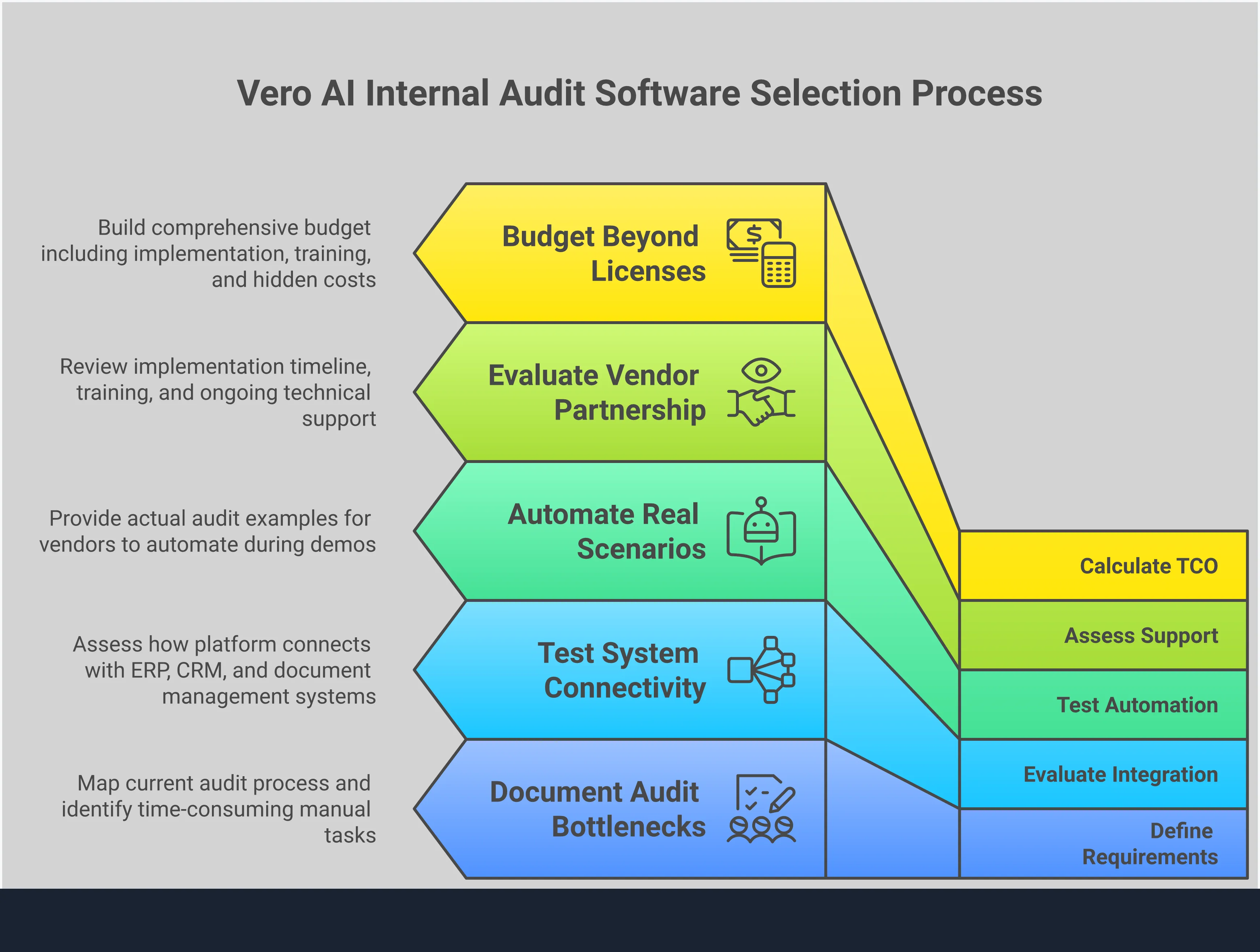
Define Your Organization’s Compliance Needs
Before you evaluate software options, you must clearly define your organization's requirements. Start by mapping out the specific management system standards and frameworks you operate under, such as the Sarbanes-Oxley Act (SOX), ISO 27001, or HIPAA. Identify the most time-consuming parts of your current audit process. Are your auditors spending too much time manually collecting evidence? Is reporting a bottleneck at the end of each quarter? Involve key stakeholders from internal audit, IT, and compliance to build a comprehensive list of needs. This initial step helps you create a clear scorecard to measure each potential solution against.
Evaluate Vendors with Demos and Free Trials
Seeing a platform in action is an essential part of the selection process. Schedule demos with your shortlisted vendors and come prepared with specific use cases. Ask them to show you exactly how their software would handle a complex piece of evidence or automate a control test that is currently a manual burden. Many vendors offer free trials or pilot programs, which allow you to test the software in your own environment. This hands-on experience is the best way to confirm if the user interface is intuitive for your team and if the platform delivers on its promises before you make a financial commitment.
Test Integration with Your Current Systems
Your internal audit software does not operate in a vacuum. It must connect seamlessly with your existing enterprise systems, such as Governance, Risk, and Compliance (GRC) platforms, cloud storage, and Enterprise Resource Planning (ERP) systems. During your evaluation, ask detailed questions about integration capabilities. Does the software have pre-built connectors for the tools you already use? If not, what does the process for building a custom integration look like? A lack of smooth data exchange can create information silos and require manual workarounds, undermining the efficiency gains you hope to achieve.
Assess Vendor Support and Implementation
The quality of a vendor’s support and onboarding can determine the success of your implementation. Look beyond the software’s features and evaluate the team behind it. Ask about their standard implementation process and timeline. What kind of training and resources do they provide to get your team up to speed? A strong partner will offer robust technical support, a dedicated account manager, and a clear plan for a smooth transition. This level of support is crucial for encouraging user adoption and maximizing the value of your investment from day one.
Consider Long-Term Scalability and the Product Roadmap
The internal audit software you choose today should support your organization's growth tomorrow. Consider whether the platform can scale to accommodate more users, an increasing number of controls, and new business units. It should also be flexible enough to adapt to future regulatory changes. Ask vendors to share their product roadmap. This gives you insight into their vision and planned enhancements. Choosing a forward-thinking partner ensures your audit capabilities will evolve alongside your business, helping you stay ahead of emerging risks and compliance demands.
Related Articles
FAQs: Internal Audit Softwares Comparison
Table of Contents

Eric Sydell, PhD
Eric has two decades of experience in enterprise technology and was a founder of Modern Hire, which became part of Hirevue in 2023.