Article
A Buyer's Guide to Internal Audit Software

Mike Reeves, PhD
|
Updated on
|
Created on
The pressure on internal audit teams to do more with less is constant. Compliance requirements are expanding, business operations are growing more complex, and the demand for broader risk coverage is increasing. However, audit department headcounts often remain flat. This efficiency gap cannot be closed by simply working harder. The solution lies in technology that acts as a force multiplier for your team. Internal audit software automates the time-consuming, repetitive tasks that consume the majority of an auditor's day. By handling routine evidence review and sample testing, these platforms can make auditors significantly more productive, allowing them to expand testing coverage without expanding the team.
Key Takeaways
Focus on strategic work, not manual tasks: Audit software automates repetitive evidence review and testing, allowing your team to concentrate on complex risk analysis and judgment-based activities.
Evaluate software with a clear plan: Define your team's specific needs before looking at vendors, assess how each tool integrates with your current systems, and treat the selection as a long-term partnership.
Plan for implementation challenges: A successful rollout requires more than just buying software; address team training, data migration, and budget management early to ensure your team adopts the new tool effectively.
What Is Internal Audit Software?
Internal audit software is a tool that helps organizations manage their entire audit process. It supports activities from initial planning and risk assessment to execution, reporting, and fixing any issues found. These platforms help streamline audit workflows and centralize important documents.
Many modern audit tools are part of a broader system for Governance, Risk, and Compliance (GRC). This approach helps shift internal audit from a periodic event to a more proactive, continuous activity. Instead of only looking back at what happened, teams can monitor controls and risks in real time. This helps organizations stay prepared for audits at all times.
Key Capabilities of Modern Audit Platforms
Modern audit platforms provide a single place to manage audit, risk, and compliance activities. This integration helps make business operations more efficient. Instead of using separate spreadsheets and documents, teams can work from a unified system. These tools give leaders real-time visibility into the audit process through instant reports and dashboards.
The best platforms cover every step of an audit. This includes creating an audit plan, scheduling tasks, collecting evidence, and tracking follow-up actions. By combining these functions, the software helps ensure that nothing falls through the cracks. It also makes sure the entire process is documented correctly from start to finish.
The Move From Manual to Automated Auditing
Automation is changing how internal audit teams work. Artificial intelligence can handle many of the routine tasks that used to consume an auditor's time. This includes testing samples, checking documents, and organizing evidence. By automating this work, software can significantly reduce manual effort and improve the overall quality of an audit.
This shift does not replace auditors. Instead, it allows them to focus on more important work. With routine tasks handled by technology, auditors can spend more time on complex analysis, risk evaluation, and strategic thinking. This helps the internal audit function provide more value to the organization by focusing on judgment-based work.
Primary Benefits of Adopting Audit Software
Adopting internal audit software helps organizations improve compliance and make their audit processes more efficient and accurate. It provides a structured way to organize audit documents, making it easier to find and reference information. This is especially helpful when presenting findings to management or external auditors, as it provides clear, data-based evidence.
The software also helps teams stay on top of their compliance requirements. By automating tasks and providing clear workflows, it reduces the risk of human error. This leads to a stronger, more defensible compliance posture. Many platforms also offer features like interactive reporting, which can make it easier to communicate audit results and track progress on remediation plans.
Essential Features of Internal Audit Software
When evaluating internal audit software, teams should look for specific features that address the core challenges of manual auditing. The right platform moves beyond simple task management. It provides tools for automated testing, centralized evidence handling, and real-time visibility into risk and compliance. These capabilities help audit teams work more efficiently and provide greater assurance to the organization. The goal is to find a solution that not only streamlines existing workflows but also enhances the strategic value of the internal audit function. A platform with these essential features can transform auditing from a periodic, reactive exercise into a continuous, proactive process.
Automated Testing and Evidence Evaluation
Modern audit platforms use artificial intelligence to perform routine testing tasks that once consumed thousands of hours. This includes sampling large datasets, reviewing evidence against control requirements, and identifying potential exceptions. According to research from Clark Schaefer Consulting, this automation allows auditors to focus more time on critical analysis and risk evaluation. Effective software can interpret complex evidence types, such as messy PDFs or spreadsheets with embedded screenshots, without needing manual cleanup. This frees auditors from repetitive work and allows them to concentrate on judgment-based activities that require their expertise.
Centralized Document Management and Audit Trails
A key feature of any audit software is a centralized repository for all documentation. This system acts as a single digital library for audit plans, workpapers, evidence, findings, and final reports. According to the software provider Quantivate, this centralized storage allows for easy access and management of all audit-related materials. More importantly, it creates a complete and traceable audit trail. Every conclusion is linked back to the specific evidence evaluated and the testing procedure applied. This traceability is essential for quality assurance reviews and for defending findings to regulators and external auditors.
Real-Time Monitoring and Custom Dashboards
Effective audit software provides a current, clear picture of all audit activities. Through dashboards and reporting tools, leaders can see the status of audits, track findings, and monitor remediation efforts as they happen. This gives organizations real-time insights into their compliance posture. Instead of discovering issues only during a quarterly or annual audit cycle, teams can identify and address control weaknesses continuously. This proactive approach helps reduce risk and prevents small gaps from becoming significant problems down the line.
Integration With Existing Enterprise Systems
Internal audit software should not operate in a silo. It must connect with the other systems your business relies on, including enterprise resource planning (ERP) platforms, cloud storage, and governance, risk, and compliance (GRC) tools. The ability to connect with programs you already use is critical for streamlining evidence collection and avoiding manual data entry. Smooth integration ensures that auditors can pull necessary information directly from source systems. This improves the efficiency of testing and the integrity of the evidence gathered.
Compliance Management Across Multiple Frameworks
Many organizations must comply with multiple regulations and standards, such as the Sarbanes-Oxley Act (SOX), ISO 27001, and SOC 2. The software you choose should support testing across these different frameworks from a single platform. This capability allows teams to map controls to multiple requirements and test them once, rather than performing redundant work for each audit. Managing regulatory compliance in a unified way saves significant time. It also ensures consistency in how controls are applied and evaluated across the entire organization.
How to Evaluate Internal Audit Solutions
Choosing the right internal audit software is a critical decision that impacts your team's efficiency and your organization's risk posture. A structured evaluation process helps you move beyond vendor demos and select a platform that solves your specific challenges. This involves looking inward at your own processes before looking outward at the market. By first defining your requirements, you can create a clear scorecard to measure potential solutions against.
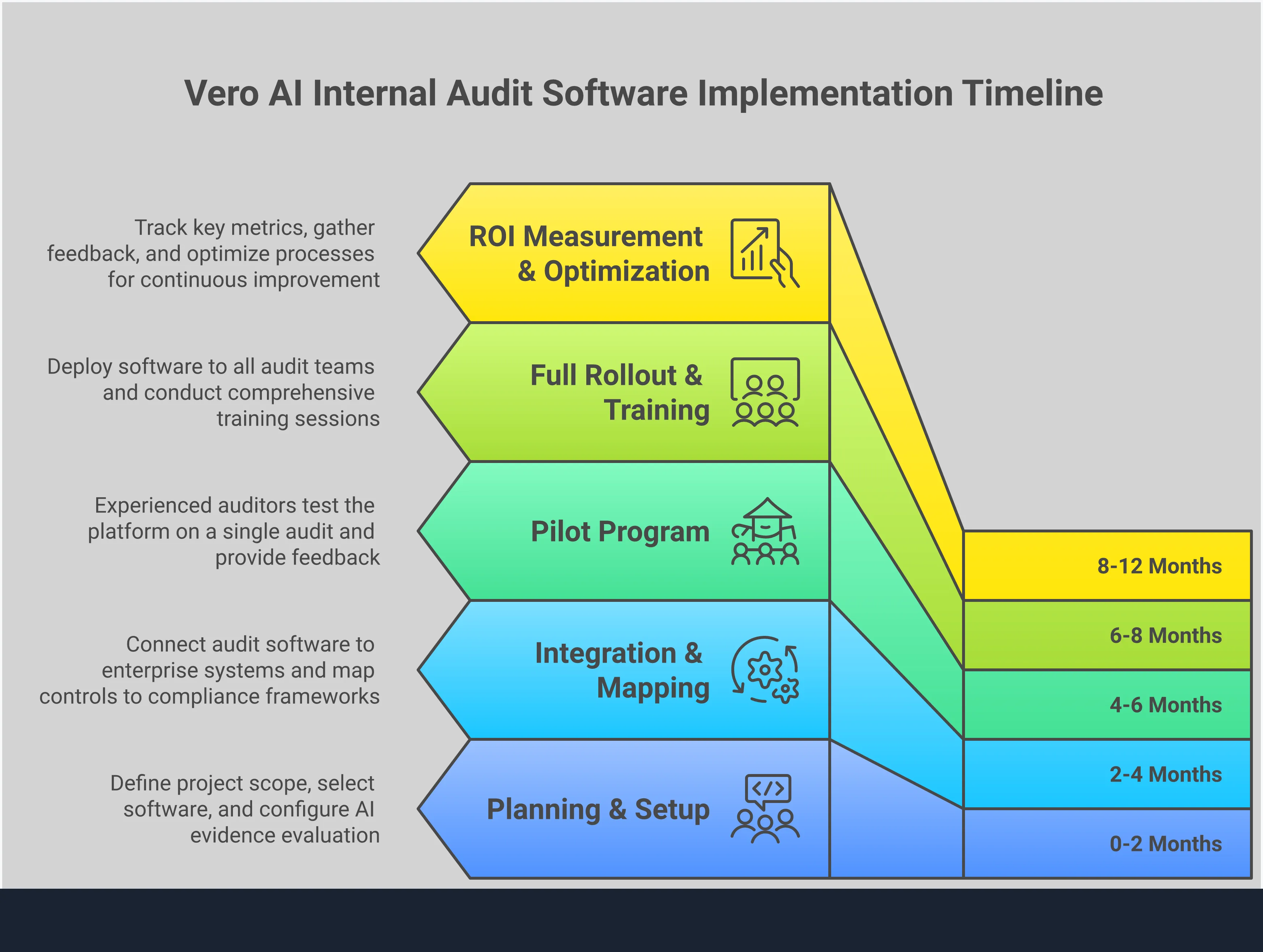
This evaluation should cover four key areas. First, you need a deep understanding of your core audit needs and workflows. Where does your team spend most of its time? What are the biggest sources of friction in your audit cycle? Second, you must decide between traditional workflow tools and modern, AI-powered platforms that automate substantive testing. This choice will define the future of your audit function. Third, you need to assess how a new solution will integrate with your existing technology stack and what the implementation process entails. A great tool that doesn't work with your other systems is not a great tool for you. Finally, it's important to look beyond the software's features and review the vendor's support model, treating them as a long-term partner. A methodical approach ensures you select a tool that not only meets today's needs but also scales with your program in the future.
Define Your Core Audit Requirements
Before you can evaluate software, you must first understand your team’s needs. Internal audit software is designed to help manage the entire audit lifecycle, from planning and risk assessment to execution and reporting. Start by mapping your current processes. Identify the most time-consuming tasks, such as evidence collection, sample testing, and workpaper preparation. Where are the bottlenecks that slow down your audit cycles?
Create a checklist of essential capabilities. This list should distinguish between "must-have" features and "nice-to-have" additions. Core requirements often include centralized workpaper management, risk control matrices, issue tracking, and reporting dashboards. Having a clear set of criteria makes your evaluation process more objective and helps you focus on the solutions that address your most significant pain points.
Compare AI-Powered vs. Traditional Platforms
The market for audit tools includes both traditional platforms and newer, AI-powered systems. Traditional software is useful for organizing workflows and managing documentation. It acts as a central repository for your audit program. However, AI-powered platforms can fundamentally change how audits are performed. As noted by Clark Schaefer Consulting, AI helps internal auditors do their jobs better and faster; it does not replace them.
These advanced systems automate the manual review of evidence. Instead of just storing documents, they can read a messy PDF or a complex spreadsheet, evaluate it against a specific control, and determine if it passes or fails. This allows teams to move from small sample sizes to testing 100% of a population, providing much deeper assurance. The choice is between a system that helps you manage manual work and one that automates it.
Assess Integration and Implementation Needs
A new tool should simplify your work, not create new silos. Before committing to a platform, confirm it can connect with the systems you already use. According to DataSnipper, you should "make sure the new software connects well with programs you already use." This includes enterprise resource planning (ERP) systems, cloud storage providers, and existing governance, risk, and compliance (GRC) platforms. Ask vendors about their application programming interfaces (APIs) and pre-built connectors.
Also, consider the implementation process. How much work will be required from your team to get the system running? A smooth onboarding process is critical for driving adoption. The best tools should fit your existing workflows and require minimal disruption, allowing your team to see value quickly without a lengthy or complex setup.
Review Vendor Support and Partnership Models
The software itself is only part of the equation. You are also choosing a long-term partner who will support your team's success. As research from Wolters Kluwer suggests, you should "consider several factors beyond just pricing." Look into the vendor’s customer support model, training resources, and product development roadmap. A strong partner will offer more than just a technical help desk.
Ask potential vendors about their onboarding process and the availability of a dedicated customer success manager. Find out how they gather customer feedback and incorporate it into future product updates. Pricing is often negotiable, but the quality of the partnership is not. Choose a vendor that is invested in your success and acts as an extension of your team.
Common Implementation Challenges to Anticipate
Adopting new internal audit software can transform your processes, but the transition requires careful planning. Anticipating common hurdles can help you create a smoother implementation plan. From securing the initial budget to ensuring your team embraces the new tool, a proactive approach is key. Thinking through these challenges ahead of time helps you avoid delays, manage expectations, and realize the full value of your investment faster.
Securing Budget and Managing Costs
The cost of internal audit software is not always straightforward. Pricing can be highly negotiable and often depends on factors like the number of users, the specific features you need, and the length of your contract. Before you commit, ask for detailed quotes from multiple vendors. Make sure you understand what is included in the base price versus what is considered an add-on. This clarity helps you build an accurate budget, avoid unexpected expenses, and defend the investment to leadership. A clear financial plan is the first step toward a successful implementation.
Driving Team Adoption and Managing Change
A new platform is only as good as the team that uses it. Resistance to change is natural, so a thoughtful adoption strategy is essential. It's a common mistake to assume that intuitive software requires no training. As one report notes, even easy-to-use tools need proper training time. Schedule dedicated sessions to walk your team through the new workflows and highlight how the software makes their jobs easier. By investing in training and clear communication, you can turn skepticism into support and ensure the tool is used effectively from day one.
Ensuring Data Integrity and Accuracy
Your audit conclusions are built on evidence. When you switch to a new system, you need to trust the data within it. This means planning for a clean and accurate data migration. Start by cleaning up your existing data before you move it. When evaluating software, look for platforms built on established frameworks. For example, software that follows ISO 19011 guidelines helps enforce core audit principles like objectivity and an evidence-based approach. This commitment to standards helps maintain data integrity and builds confidence in the platform’s findings.
Integrating Systems and Migrating Data
Internal audit software rarely works in isolation. It needs to connect with your company’s existing technology, such as enterprise resource planning (ERP) systems or governance, risk, and compliance (GRC) platforms. Before making a decision, confirm that the new tool is compatible with your current systems. A lack of integration can create data silos and manual workarounds, defeating the purpose of automation. Map out your integration needs early and discuss them with potential vendors. A smooth integration process is critical for a seamless transition and uninterrupted workflow.
Defining and Measuring Success
How will you know if your new software is a success? Before you begin implementation, define clear metrics to track your return on investment. These key performance indicators (KPIs) could include reduced audit cycle times, fewer documentation errors, or more controls tested per auditor. Aligning your goals with recognized standards can also demonstrate progress. Achieving compliance with global audit standards, for instance, shows a commitment to quality that strengthens your team's reputation. Tracking these metrics provides clear evidence of the software's value to your organization and its leadership.
Making Your Final Decision
After narrowing down your options, the final steps involve a close look at the financial and practical details of each solution. A thorough evaluation of pricing models, long-term costs, framework support, and the vendor partnership will help you select the right platform for your team. This final diligence ensures the software not only meets your technical requirements but also aligns with your budget and strategic goals.
Analyze Different Pricing Models
Most audit software vendors use a modular pricing structure. You typically pay for specific solutions, like SOX Compliance or Enterprise Risk Management. The final price often depends on the number of licensed users, which modules you select, and the length of your contract. For example, some platforms price their software based on these factors. When requesting quotes, ask for a detailed breakdown so you can compare different packages accurately. Understand what is included in the base price versus what is considered an add-on to avoid unexpected costs later.
Calculate the Total Cost of Ownership
The subscription fee is only one part of the investment. To understand the full financial impact, you need to calculate the total cost of ownership (TCO). This includes one-time implementation fees, data migration costs, training for your team, and any ongoing maintenance or support charges. Do not hesitate to negotiate. Buyers who secure multi-year contracts with clear terms for price increases can often achieve a significantly lower total cost over the life of the agreement. Planning for these associated expenses gives you a more realistic budget and helps justify the investment to leadership.
Confirm Regulatory Framework Support
Your chosen software must support the specific regulatory frameworks your organization follows. Whether it's SOX, ISO 27001, SOC 2, or HIPAA, the platform needs the capability to manage and test controls against those requirements. This adherence to regulations is not just a technical requirement; it is fundamental to your company's credibility. A platform that supports multiple frameworks allows you to harmonize compliance activities across different standards. This creates efficiency and provides a unified view of your organization's compliance posture, which is critical for reporting to the board and external auditors.
Evaluate Vendor Support and Training
The software itself is only part of the solution. The quality of the vendor’s support and training programs will directly impact your team's success. When evaluating vendors, ask detailed questions about their onboarding process, the availability of technical support, and the training resources they provide. Do they offer a dedicated customer success manager? A strong partnership ensures you can resolve issues quickly and get the most value from the platform. As experts suggest, there are several considerations when purchasing internal audit software beyond just the price tag, and vendor support is a critical one.
Related Articles
FAQs: Internal Audit Software
Table of Contents

Mike Reeves, PhD
Mike is a key figure at the intersection of psychology and technology. He has created and managed algorithms and decision-making tools used by more than half of the Fortune 100.